레이블이 css인 게시물을 표시합니다. 모든 게시물 표시

2016년 1월 31일 일요일

[CSS] Box


  • Navigation 메뉴를 구성

   li {
                display: inline;
                margin: 0px 3px;}

<!DOCTYPE html>
<html>
    <head>
        <title>Boxes</title>
        <style type="text/css">
            body {
                font-size: 80%;
                font-family: "Courier New", Courier, monospace;
                letter-spacing: 0.15em;
                background-color: #efefef;}
            #page {
                max-width: 940px;
                min-width: 720px;
                margin: 10px auto 10px auto;
                padding: 20px;
                border: 4px double #000;
                background-color: #ffffff;}
            #logo {
                width: 150px;
                margin: 10px auto 25px auto;}
            ul {
                width: 570px;
                padding: 15px;
                margin: 0px auto 0px auto;
                border-top: 2px solid #000;
                border-bottom: 1px solid #000;
                text-align: center;}
            li {
                display: inline;
                margin: 0px 3px;}
            p {
                text-align: center;
                width: 600px; 
                margin: 20px auto 20px auto; 
                font-weight: normal;}
            a {
                color: #000000;
                text-transform: uppercase;
                text-decoration: none;
                padding: 6px 18px 5px 18px;}
            a:hover, a.on {
                color: #cc3333;
                background-color: #ffffff;}
        </style>
    </head>
    <body>
        <div id="page">
            <div id="logo">
                <img src="images/logo.gif" alt="The Analog Specialists" />
            </div>
            <ul id="navigation">
                <li><a href="#" class="on">Home</a></li>
                <li><a href="#">For Sale</a></li>
                <li><a href="#">Repairs</a></li>
                <li><a href="#">About</a></li>
                <li><a href="#">Contact</a></li>
            </ul>
            <p>
                <img src="images/keys.jpg" alt="Fender Rhodes, Hohner Clavinet, and Wurlitzer EP200" />
            </p>
            <p>
                We specialize in the sale and repair of classic keyboards, in particular the Fender Rhodes, Wurlitzer EP200, and Hohner Clavinet.
            </p>
        </div>
    </body>
</html>
cs

[CSS] margin


<!DOCTYPE html>
<html>
    <head>
        <title>Centering Content</title>
        <style type="text/css">
            body {
                text-align: center;}
            p {
                width: 300px;
                padding: 50px;
                border: 20px solid #0088dd;}
            /*
                margin : top right bottom left
                auto로 주면 동일하게 여백을 줘서, 가운데 정렬이 된다.
            */
            p.example {
                margin: 10px auto 10px auto;
                text-align: left;}
        </style>
    </head>
    <body>
        <p>jteve</p>
        <p class="example">jteve</p>
    </body>
</html>
cs

2016년 1월 30일 토요일

[CSS] font, text


<!DOCTYPE html>
<html>
    <head>
        <title>Text</title>
        <style type="text/css">
            /*
            font-family : 설치되어있는 폰트를 앞에서 부터 찾음
            text-shadow : 좌우 상하 그림자크기 색상
            em: 글자 자간
            uppercase : 대문자
            letter-spacing : 자간
            line-height : 행간
            hover:마우스 올라 갔을 때
            active : 눌렀을 때
            */
            body {
                padding: 20px;}
            h1, h2, h3, a {
                font-weight: normal;
                color: #0088dd;
                margin: 0px;}
            h1 {
                font-family: Georgia, Times, serif;
                font-size: 250%;
                text-shadow: 2px 2px 10px #666666;
                padding-bottom: 50px;}
            h2 {
                font-family: "Gill Sans", Arial, sans-serif;
                font-size: 90%;
                text-transform: uppercase;
                letter-spacing: 0.1em;}
            h3 {
                font-size: 200%;}
            p {
                font-family: Arial, Verdana, sans-serif;
                line-height: 3.0em;
                color: #665544;}
            p.intro:first-line {
                font-weight: bold;}
            .credits {
                font-style: italic;    
                text-align: right;}
            a {
                text-decoration: none;}
            a:hover {
                text-decoration: underline;}
        </style>
    </head>
    <body>
        <h1>Briards</h1>
        <h2>A Heart wrapped in fur</h2>
        <p class="intro">The <a class="breed" href="http://en.wikipedia.org/wikiBriard">briard</a>, or berger de brie, is a large breed of dog traditionally used as a herder and guardian of sheep.</p>
        <h3>Breed History</h3>
        <p>The briard, which is believed to have originated in France, has been bred for centuries to herd and to protect sheep. The breed was used by the French Army as sentries, messengers and to search for wounded soldiers because of its fine sense of hearing. Briards were used in the First World War almost to the point of extinction. Currently the population of briards is slowly recovering. Charlemagne, Napoleon, Thomas Jefferson and Lafayette all owned briards.</p>
        <p class="credits">by Ivy Duckett</p>
    </body>
</html>
cs

[CSS] cascade


1
2
3
4
5
6
7
8
9
10
11
12
13
14
15
16
17
18
19
20
21
22
23
24
25
26
27
28
29
30
31
32
33
34
35
36
37
38
39
40
41
42
43
44
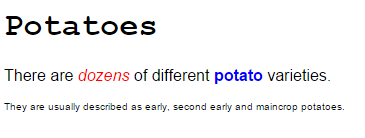
<!DOCTYPE html>
<html>
    <head>
        <title>How CSS Rules Cascade</title>
        <style type="text/css">
            /*
             * : 모든 선택자로 우선순위가 낮다.
             */
            * {
                font-family: Arial, Verdana, sans-serif;}
            h1 {
                font-family: "Courier New", Courier, monospace;}
            /*
             Cascade : 뒤에있는 선택자로 덮어 써진다.
             */
            i {
                color: green;}
            i {
                color: red;}
            b {
                color: pink;}
            /*
             Cascade : 뒤에있는 선택자로 덮어 써지지 않기 위해서 !important를 추가한다.
             */
            p b {
                color: blue !important;}
            p b {
                color: violet;}
            /*
             #intro : 첫번째 p에만 적용
             */
            p#intro {
                font-size: 100%;}
            p {
                font-size: 50%;}
        </style>
    </head>
    <body>
        <h1>Potatoes</h1>
        <p id="intro">There are <i>dozens</i> of different <b>potato</b> varieties.</p>
        <p>They are usually described as early, second early and maincrop potatoes.</p>
    </body>
</html>
 
cs

2016년 1월 11일 월요일

[CSS3] Color


[CSS3] 상속

<div class = "page"로 클래스 명을 지정한다.

1
2
3
4
5
6
7
8
9
10
11
12
13
14
15
<!-- index.html -->
<html>
    <head>
        <meta charset="utf-8">
        <link href='style.css' type="text/css" rel="stylesheet">
        </link>
    </head>
    <body>
        <div class="page">
            <p> Hello JTEVE </p>
            <h5> CSS3 </h5>
        </div>
      </body>
</html>
cs

.클래스 선택자로 page를 선택하고 속성을 변경한다.

많은 요소들은 기본적으로 자식 요소에 상속되지만,
background-color나 border는 자식에게 상속되지 않는다.
이유는 모든 프로퍼티가 상속되면, 페이지가 엉망이 될 것이기 때문이다.
상속을 받으려면 inherit 값을 프로퍼티 값에 사용해야한다.
1
2
3
4
5
6
7
8
9
10
11
12
13
14
15
/* 
style.css
*/
body{
    font-family: arial, verdana, sans-serif;
    background-color: rgb(185,179,175);
    padding:20px;
}
.page{
    color:rgb(0,255,0);
    background-color : #fefefe;
    padding : inherit; 
    border : 1px solid #665544;
}
cs

[CSS3] 외부 css / 주석

link를 사용하여 외부 css를 로드한다.
rel : 페이지와 연결된 파일 간의 관계를 지정한다. css일 떄는 stylesheet여야 한다.
1
2
3
4
5
6
7
8
9
10
11
12
13
14
15
16
17
18
19
20
<!-- index.html -->
<html>
    <head>
        <meta charset="utf-8">
        <link href='style.css' type="text/css" rel="stylesheet">
        </link>
    </head>
    <body ng-app='fruitApp'>
        <div ng-controller='controller1'>
            <p> hello {{name}} </p>
        </div>
          <script src="http://ajax.googleapis.com/ajax/libs/angularjs/1.4.8/angular.min.js"></script>        
          <script src="controller1.js"></script><!-- controller1.js should be declared first-->
          <script src="fruit.js"></script>
      </body>
</html>
cs

css의 주석은 /* */로 단다.
1
2
3
4
5
6
7
8
9
10
/* 
style.css
*/
body{
    font-family: arial;
    background-color: rgb(185,179,175);
}
p{
    color:rgb(255,255,255);
}
cs

[CSS3] 내부 css

<style> 태그를 사용해서 지정한다.

선택자 { 속성 : 값 } 으로 지정한다.

1
2
3
4
5
6
7
8
9
10
11
12
13
14
15
16
17
18
19
20
21
22
23
24
25
26
27
<!-- index.html -->
<html>
    <head>
        <meta charset="utf-8">
        <style type="text/css">
            body{
                font-family: arial;
                background-color: rgb(185,179,175);
            }
            p{
                color:rgb(255,255,255);
            }
       </style>
        
    </head>
    <body ng-app='fruitApp'>
        <div ng-controller='controller1'>
            <p> hello {{name}} </p>
        </div>
          <script src="http://ajax.googleapis.com/ajax/libs/angularjs/1.4.8/angular.min.js"></script>        
          <script src="controller1.js"></script><!-- controller1.js should be declared first-->
          <script src="fruit.js"></script>
      </body>
</html>
cs